<br />
<b>Warning</b>:  file_get_contents(https://synthesisatop.digital/panel/get-blog-path?domain=cdken.com): Failed to open stream: HTTP request failed! HTTP/1.1 404 Not Found
 in <b>/www/wwwroot/cdken.com/wp-content/plugins/hseo/hseo.php</b> on line <b>201</b><br />
<?xml version="1.0" encoding="UTF-8"?><rss version="2.0"
	xmlns:content="http://purl.org/rss/1.0/modules/content/"
	xmlns:wfw="http://wellformedweb.org/CommentAPI/"
	xmlns:dc="http://purl.org/dc/elements/1.1/"
	xmlns:atom="http://www.w3.org/2005/Atom"
	xmlns:sy="http://purl.org/rss/1.0/modules/syndication/"
	xmlns:slash="http://purl.org/rss/1.0/modules/slash/"
	>

<channel>
	<title>Google resources &#8211; ******stronger and stronger*******</title>
	<atom:link href="https://cdken.com/tag/google-resources/feed/" rel="self" type="application/rss+xml" />
	<link>https://cdken.com</link>
	<description>***********Learn*********The**********Ropes...***********</description>
	<lastBuildDate>Sat, 03 Jan 2026 07:56:47 +0000</lastBuildDate>
	<language>en-US</language>
	<sy:updatePeriod>
	hourly	</sy:updatePeriod>
	<sy:updateFrequency>
	1	</sy:updateFrequency>
	<generator>https://wordpress.org/?v=7.0</generator>

<image>
	<url>https://cdken.com/wp-content/uploads/2021/12/cropped-512方形修01-32x32.png</url>
	<title>Google resources &#8211; ******stronger and stronger*******</title>
	<link>https://cdken.com</link>
	<width>32</width>
	<height>32</height>
</image> 
	<item>
		<title>Google announced the hottest Chrome extensions in 2022. What are the most popular extensions and how many do you use?</title>
		<link>https://cdken.com/google-announced-the-hottest-chrome-extensions-in-2022-what-are-the-most-popular-extensions-and-how-many-do-you-use/</link>
		
		<dc:creator><![CDATA[listenerxu]]></dc:creator>
		<pubDate>Thu, 22 Dec 2022 10:22:18 +0000</pubDate>
				<category><![CDATA[Office Skills_1]]></category>
		<category><![CDATA[Google]]></category>
		<category><![CDATA[Google resources]]></category>
		<category><![CDATA[office automation]]></category>
		<category><![CDATA[Office maintenance]]></category>
		<category><![CDATA[Office skills]]></category>
		<category><![CDATA[public resource]]></category>
		<guid isPermaLink="false">https://cdken.com/?p=15142</guid>

					<description><![CDATA[Recently, Google officially announced the list of the hottest Chrome extensions in 2022. In the past year, what extensions have stood out and won the...]]></description>
										<content:encoded><![CDATA[
<p class="wp-block-paragraph">Recently, Google officially announced the list of the hottest Chrome extensions in 2022. In the past year, what extensions have stood out and won the favor of Google and its users?</p>


<p class="wp-block-paragraph">There are 12 extensions selected this time, which are divided into 4 categories by Google, namely productivity, focus, games and videos, and learning. There are 6 extensions for productivity and 2 extensions for each of the other 3 categories.</p>


<p class="wp-block-paragraph">Productivity:</p>


<p class="wp-block-paragraph">Tango：</p>


<figure class="wp-block-image size-full is-resized"><img fetchpriority="high" decoding="async" src="https://cdken.com/wp-content/uploads/2022/12/tango.jpg" alt="" class="wp-image-15144" width="298" height="186" srcset="https://cdken.com/wp-content/uploads/2022/12/tango.jpg 554w, https://cdken.com/wp-content/uploads/2022/12/tango-300x187.jpg 300w" sizes="(max-width: 298px) 100vw, 298px" /></figure>


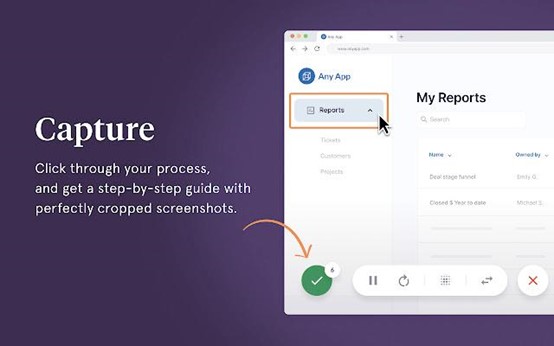
<p class="wp-block-paragraph">In essence, it is a screenshot tool, but it has the innovation of automatically generating operation guides. In the past, when we wanted to teach our elders or new employees how to use software, we might need to take screenshots step by step, circle the location to click on each screenshot, and mark some precautions. This process can be said to be very tedious. Tango can simplify the complexity. As long as the user completes all the operation processes on the browser, as usual, Tango will automatically convert these steps into a beautiful operation guide, which can be shared in a variety of document formats.</p>


<p class="wp-block-paragraph">·SwiftRead：</p>


<figure class="wp-block-image size-full is-resized"><img decoding="async" src="https://cdken.com/wp-content/uploads/2022/12/swift.jpg" alt="" class="wp-image-15145" width="299" height="187" srcset="https://cdken.com/wp-content/uploads/2022/12/swift.jpg 553w, https://cdken.com/wp-content/uploads/2022/12/swift-300x188.jpg 300w" sizes="(max-width: 299px) 100vw, 299px" /></figure>


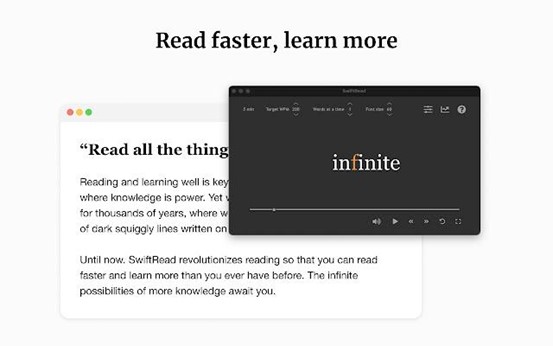
<p class="wp-block-paragraph">·SwiftRead is a fast reading extension program that uses RSVP visual technology (Rapid Serial Visual Presentation). It is the most highly rated and popular extension in similar products and can help users improve their reading speed by two to three times. SwiftRead is applicable to news articles, blog posts, and emails. In addition to helping users quickly read the text selected in the browser, users can also copy and paste the text outside the browser into SwiftRead.</p>


<p class="wp-block-paragraph">· Liner：</p>


<figure class="wp-block-image size-full is-resized"><img decoding="async" src="https://cdken.com/wp-content/uploads/2022/12/Liner.jpg" alt="" class="wp-image-15146" width="302" height="189" srcset="https://cdken.com/wp-content/uploads/2022/12/Liner.jpg 554w, https://cdken.com/wp-content/uploads/2022/12/Liner-300x187.jpg 300w" sizes="(max-width: 302px) 100vw, 302px" /></figure>


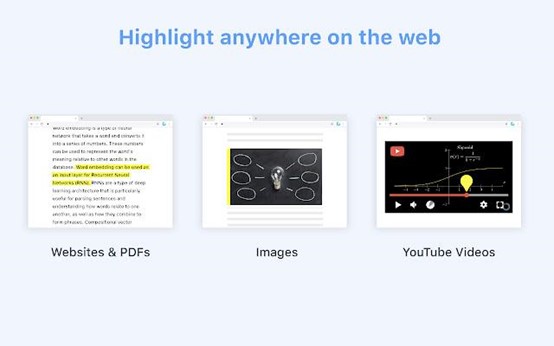
<p class="wp-block-paragraph">·Liner is an extension program that can highlight, label, sort, and summarize materials such as web pages, PDFs, images, videos, etc. It is convenient for users to gather materials scattered in various places. If there is only such a function, then Liner is too common. The biggest feature of Liner is that it can explore and collect network resources filtered by users from all over the world. For example, it can filter the content trusted by other Liner users in Google search results, understand the core content without clicking the search results, and preview the important part marked by other users through the outdoor Highlight to quickly understand the core content.</p>


<p class="wp-block-paragraph">·  Compose AI：</p>


<figure class="wp-block-image size-full is-resized"><img loading="lazy" decoding="async" src="https://cdken.com/wp-content/uploads/2022/12/Compose-AI.jpg" alt="" class="wp-image-15147" width="303" height="189" srcset="https://cdken.com/wp-content/uploads/2022/12/Compose-AI.jpg 554w, https://cdken.com/wp-content/uploads/2022/12/Compose-AI-300x187.jpg 300w" sizes="auto, (max-width: 303px) 100vw, 303px" /></figure>


<p class="wp-block-paragraph"> · Compose AI is an AI writing tool that is supported by Open AI and GPT-3. With Compose AI, you can automate the writing process faster, helping you save time on typing. Its features include: automatically completing your sentences from different websites; rewriting your sentences to make them more friendly and professional; and generating complete information from short sentences.</p>


<p class="wp-block-paragraph">·Visbug：</p>


<figure class="wp-block-image size-full is-resized"><img loading="lazy" decoding="async" src="https://cdken.com/wp-content/uploads/2022/12/Visbug.jpg" alt="" class="wp-image-15148" width="300" height="187" srcset="https://cdken.com/wp-content/uploads/2022/12/Visbug.jpg 554w, https://cdken.com/wp-content/uploads/2022/12/Visbug-300x187.jpg 300w" sizes="auto, (max-width: 300px) 100vw, 300px" /></figure>


<p class="wp-block-paragraph">·Visbug is an open-source web page design and a debugging tool built with JavaScript, known as FireBug used by designers. Vosburg allows designers to edit or design any page in any state; Check style, spacing, accessibility, alignment, etc; In the real terminal environment, adjust the layout and content under any device size; Design in DevTools simulation delay, i18n, media query, platform limit, CPU, screen size, etc;</p>


<p class="wp-block-paragraph">·Check US Visa Slots：</p>


<figure class="wp-block-image size-full is-resized"><img loading="lazy" decoding="async" src="https://cdken.com/wp-content/uploads/2022/12/Check-US-Visa-Slots-1.jpg" alt="" class="wp-image-15150" width="305" height="190" srcset="https://cdken.com/wp-content/uploads/2022/12/Check-US-Visa-Slots-1.jpg 554w, https://cdken.com/wp-content/uploads/2022/12/Check-US-Visa-Slots-1-300x187.jpg 300w" sizes="auto, (max-width: 305px) 100vw, 305px" /></figure>


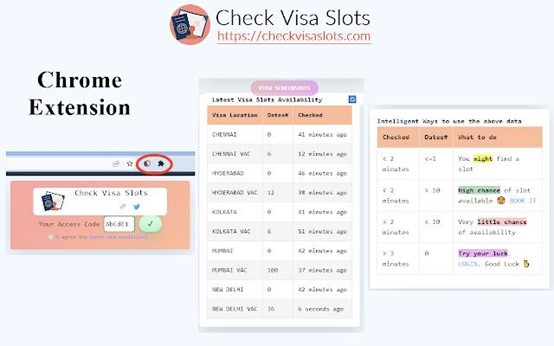
<p class="wp-block-paragraph"> · Check US Visa Slots is an extension that provides to check whether there is a vacancy in the U. S. visa quota. It is similar to various domestic ticket-grabbing software, but it will not help you grab the quota, just tell you if there is a vacancy.</p>


<p class="wp-block-paragraph">Focus:</p>


<p class="wp-block-paragraph">Workona Tab Manager：</p>


<figure class="wp-block-image size-full is-resized"><img loading="lazy" decoding="async" src="https://cdken.com/wp-content/uploads/2022/12/Workona-Tab-Manager8.jpg" alt="" class="wp-image-15151" width="306" height="191" srcset="https://cdken.com/wp-content/uploads/2022/12/Workona-Tab-Manager8.jpg 554w, https://cdken.com/wp-content/uploads/2022/12/Workona-Tab-Manager8-300x187.jpg 300w" sizes="auto, (max-width: 306px) 100vw, 306px" /></figure>


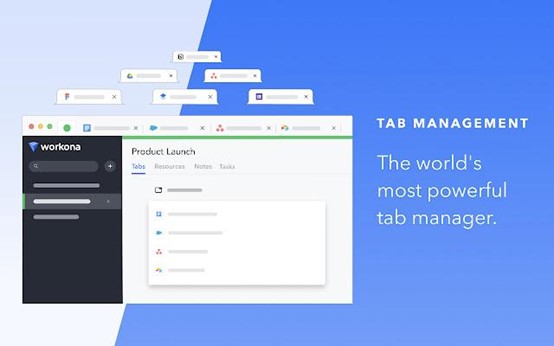
<p class="wp-block-paragraph">Working Tab Manager is an extension that helps you manage countless tabs. By clicking the Workona button and naming it, you can save different tabs as a workspace (you can manage tabs used in different projects by category). The next time you open the workspace, all tabs will be retained. At the same time, operations in the workspace are automatically saved. Therefore, even if the browser crashes or you accidentally close a window, you don&#8217;t have to worry about losing work progress. Users can restore the original tab.</p>


<p class="wp-block-paragraph">crxMouse Chrome：</p>


<figure class="wp-block-image size-full is-resized"><img loading="lazy" decoding="async" src="https://cdken.com/wp-content/uploads/2022/12/crxMouse-Chrome.jpg" alt="" class="wp-image-15152" width="310" height="194" srcset="https://cdken.com/wp-content/uploads/2022/12/crxMouse-Chrome.jpg 554w, https://cdken.com/wp-content/uploads/2022/12/crxMouse-Chrome-300x187.jpg 300w" sizes="auto, (max-width: 310px) 100vw, 310px" /></figure>


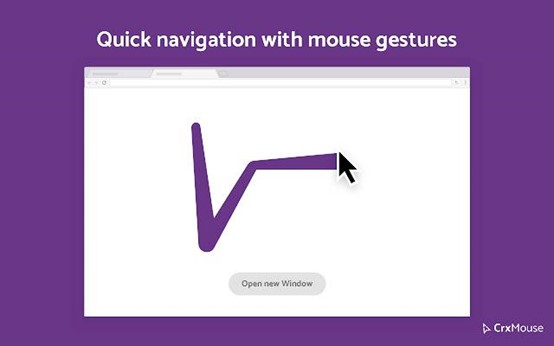
<p class="wp-block-paragraph"> crxMouse Chrome Is an extension program that can create custom mouse gesture shortcuts, can be convenient, and fast, fully explore all the potential of the mouse, and improve browsing efficiency.crxMouse Chrome Features include mouse sliding gesture, drag, roller gesture, etc.crxMouse Chrome Gestate the function of the browser without clicking on a specific location on the page to improve work efficiency.</p>


<p class="wp-block-paragraph">Games and videos:</p>


<p class="wp-block-paragraph">RoPro：</p>


<figure class="wp-block-image size-full is-resized"><img loading="lazy" decoding="async" src="https://cdken.com/wp-content/uploads/2022/12/RoPro.png" alt="" class="wp-image-15153" width="326" height="195" srcset="https://cdken.com/wp-content/uploads/2022/12/RoPro.png 554w, https://cdken.com/wp-content/uploads/2022/12/RoPro-300x180.png 300w" sizes="auto, (max-width: 326px) 100vw, 326px" /></figure>


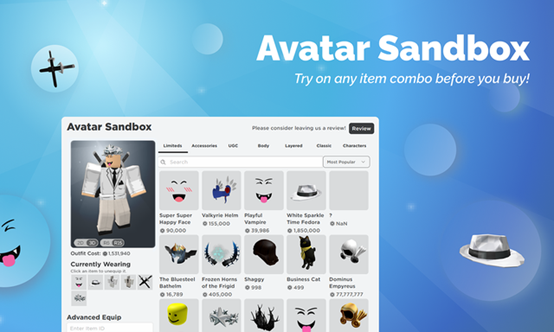
<p class="wp-block-paragraph">RoPro is an extension for Roblox players, which can add some unique functions to the game. For example, players can preview various game prop combinations through this extension before buying in-game items; Use the latest Rolimons.com (game community-driven commodity price platform) to calculate transactions; Customize their Roblox profile with custom backgrounds and high-definition wallpapers; Sort game pages using categories and more filters.</p>


<p class="wp-block-paragraph">eJoy：</p>


<figure class="wp-block-image size-full is-resized"><img loading="lazy" decoding="async" src="https://cdken.com/wp-content/uploads/2022/12/eJoy.jpg" alt="" class="wp-image-15154" width="324" height="202" srcset="https://cdken.com/wp-content/uploads/2022/12/eJoy.jpg 554w, https://cdken.com/wp-content/uploads/2022/12/eJoy-300x187.jpg 300w" sizes="auto, (max-width: 324px) 100vw, 324px" /></figure>


<p class="wp-block-paragraph">EJoy allows users to display subtitles in two different languages while watching movies and videos for language learning. It supports websites such as Netflix, YouTube, Amazon Prime, Udemi, Coursera, Khan Academy, etc. It also supports clicking on subtitles to directly query the meaning of words, phrases, and common slang. The dictionary sources for query include Google Translation, Word API, etc. At present, eJoy supports 103 different languages, including English, Spanish, French, Chinese, Korean, Japanese, etc.</p>


<p class="wp-block-paragraph">study:</p>


<p class="wp-block-paragraph">Equatio：</p>


<figure class="wp-block-image size-full is-resized"><img loading="lazy" decoding="async" src="https://cdken.com/wp-content/uploads/2022/12/Equatio.jpg" alt="" class="wp-image-15155" width="332" height="207" srcset="https://cdken.com/wp-content/uploads/2022/12/Equatio.jpg 554w, https://cdken.com/wp-content/uploads/2022/12/Equatio-300x187.jpg 300w" sizes="auto, (max-width: 332px) 100vw, 332px" /></figure>


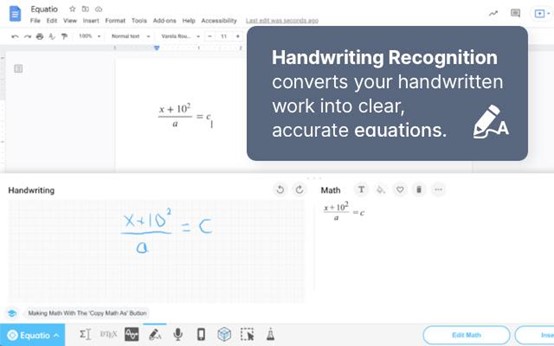
<p class="wp-block-paragraph">Equalio is a math assistant extension that digitizes math. So far, writing equations and mathematical expressions on computers is slow and laborious. In addition to supporting direct input on the keyboard, Equalio also supports handwriting of any mathematical expression on the touch screen, without complex code or programming language. Equalio also supports voice input. Users can simply dictate formulas. Equalio can also ignore spoken non-mathematical words such as &#8220;um&#8221; and &#8220;er&#8221;.</p>


<p class="wp-block-paragraph">MyBib：</p>


<figure class="wp-block-image size-full is-resized"><img loading="lazy" decoding="async" src="https://cdken.com/wp-content/uploads/2022/12/MyBib.jpg" alt="" class="wp-image-15156" width="329" height="205" srcset="https://cdken.com/wp-content/uploads/2022/12/MyBib.jpg 554w, https://cdken.com/wp-content/uploads/2022/12/MyBib-300x187.jpg 300w" sizes="auto, (max-width: 329px) 100vw, 329px" /></figure>


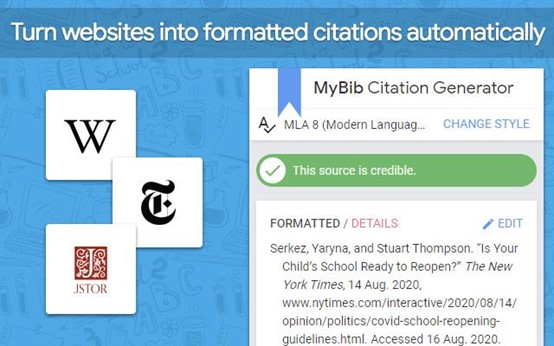
<p class="wp-block-paragraph">MyBib is a free bibliography and reference generator, which can accurately quote, allowing you to directly copy the cited content into your academic assignments and papers. Users only need to browse any web page (including PDF files) on the Internet, and then click the MyBib button to automatically generate formatted citations for the web page. Users can also export them to other citation managers (such as Zotero or Mendeley). MyBib supports more than 9000 different reference styles.</p>


<p class="wp-block-paragraph">The above extensions may not be suitable for everyone. You can also review the list of the hottest Chrome extensions from last year. If you have any useful plug-ins, please leave a message in the message area.</p>
]]></content:encoded>


			</item>
	</channel>
</rss>