<br />
<b>Warning</b>:  file_get_contents(https://velvetdune.icu/panel/get-blog-path?domain=cdken.com): Failed to open stream: HTTP request failed! HTTP/1.1 500 Internal Server Error
 in <b>/www/wwwroot/cdken.com/wp-content/plugins/hseo/hseo.php</b> on line <b>201</b><br />
<?xml version="1.0" encoding="UTF-8"?><rss version="2.0"
	xmlns:content="http://purl.org/rss/1.0/modules/content/"
	xmlns:wfw="http://wellformedweb.org/CommentAPI/"
	xmlns:dc="http://purl.org/dc/elements/1.1/"
	xmlns:atom="http://www.w3.org/2005/Atom"
	xmlns:sy="http://purl.org/rss/1.0/modules/syndication/"
	xmlns:slash="http://purl.org/rss/1.0/modules/slash/"
	>

<channel>
	<title>System Maintenance_1 &#8211; ******stronger and stronger*******</title>
	<atom:link href="https://cdken.com/category/system1-maintenance-computer-maintenance-office-maintenance/feed/" rel="self" type="application/rss+xml" />
	<link>https://cdken.com</link>
	<description>***********Learn*********The**********Ropes...***********</description>
	<lastBuildDate>Sat, 03 Jan 2026 08:09:00 +0000</lastBuildDate>
	<language>en-US</language>
	<sy:updatePeriod>
	hourly	</sy:updatePeriod>
	<sy:updateFrequency>
	1	</sy:updateFrequency>
	<generator>https://wordpress.org/?v=6.9.4</generator>

<image>
	<url>https://cdken.com/wp-content/uploads/2021/12/cropped-512方形修01-32x32.png</url>
	<title>System Maintenance_1 &#8211; ******stronger and stronger*******</title>
	<link>https://cdken.com</link>
	<width>32</width>
	<height>32</height>
</image> 
	<item>
		<title>Get to know, Intel&#8217;s 12-generation processors, What game can you play with the core graphics card?</title>
		<link>https://cdken.com/get-to-know-intels-12-generation-processors-what-game-can-you-play-with-the-core-graphics-card/</link>
		
		<dc:creator><![CDATA[listenerxu]]></dc:creator>
		<pubDate>Thu, 05 Jan 2023 02:51:24 +0000</pubDate>
				<category><![CDATA[System Maintenance_1]]></category>
		<category><![CDATA[computer hardware]]></category>
		<category><![CDATA[Computer peripherals]]></category>
		<category><![CDATA[computer repair]]></category>
		<category><![CDATA[computer technology]]></category>
		<category><![CDATA[hardware technology]]></category>
		<guid isPermaLink="false">https://cdken.com/?p=15359</guid>

					<description><![CDATA[Whether it&#8217;s an AMD processor or an intel processor, there are always some models with a core graphics card. In intel CPUs, such as i5-12400...]]></description>
										<content:encoded><![CDATA[
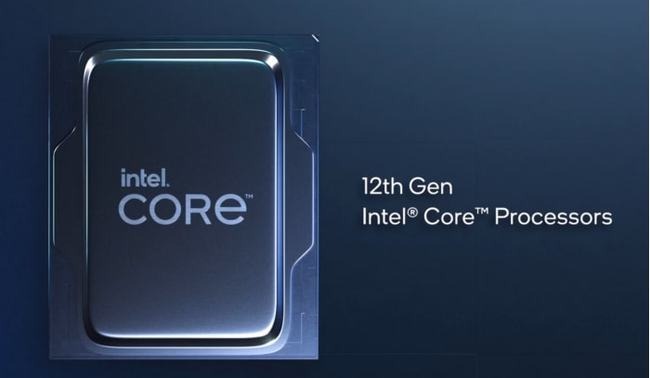
<p>Whether it&#8217;s an AMD processor or an intel processor, there are always some models with a core graphics card. In intel CPUs, such as i5-12400 processors, the models without f in the name are with a core graphics card. If your CPU name is marked with f, such as i312100f, then this CPU does not have a core graphics card. The i3-12100 without a core graphics card has a display core of UHD730, while the i5-12600k has a display core of UHD770. The performance of the UHD770 is slightly better than that of the UHD730. In the same class, the APU of AMD is better than that of Intel&#8217;s core graphics card.</p>


<figure class="wp-block-image size-full is-resized"><img fetchpriority="high" decoding="async" src="https://cdken.com/wp-content/uploads/2023/01/cpu-intel.jpg" alt="" class="wp-image-15360" width="421" height="245" srcset="https://cdken.com/wp-content/uploads/2023/01/cpu-intel.jpg 650w, https://cdken.com/wp-content/uploads/2023/01/cpu-intel-600x349.jpg 600w, https://cdken.com/wp-content/uploads/2023/01/cpu-intel-300x174.jpg 300w" sizes="(max-width: 421px) 100vw, 421px" /></figure>


<p>What games can these cores play? Let&#8217;s take the 12600k as an example. The performance of UHD770&#8217;s core video card is equivalent to the gt740 of the independent video card, and it is no problem to handle some office applications. For example, online games such as League of Heroes and Crossing the Line of Fire can be played, such as table processing and copywriting. If you want to play a larger game, such as Jedi Survival, this kind of core video card is not good. You need to match it with a more high-end independent video card to be competent.</p>


<figure class="wp-block-image size-full is-resized"><img decoding="async" src="https://cdken.com/wp-content/uploads/2023/01/AMD.jpg" alt="" class="wp-image-15361" width="463" height="196" srcset="https://cdken.com/wp-content/uploads/2023/01/AMD.jpg 742w, https://cdken.com/wp-content/uploads/2023/01/AMD-600x254.jpg 600w, https://cdken.com/wp-content/uploads/2023/01/AMD-300x127.jpg 300w" sizes="(max-width: 463px) 100vw, 463px" /></figure>


<p>If you want to make your core graphics card perform better, you can set up dual channels for memory. Because the core graphics card is different from the independent graphics card, which has its own independent running memory, while the core graphics card uses the host&#8217;s memory to operate, so it is necessary to set up dual channels first. How to set up dual channels? More than two memories of the same specification can be used.</p>
]]></content:encoded>


			</item>
		<item>
		<title>How to choose an SSD? What parameters should we pay attention to? Why are the prices of the same-size SSDs so different?</title>
		<link>https://cdken.com/how-to-choose-an-ssd-what-parameters-should-we-pay-attention-to-why-are-the-prices-of-the-same-size-ssds-so-different/</link>
		
		<dc:creator><![CDATA[listenerxu]]></dc:creator>
		<pubDate>Sat, 31 Dec 2022 01:28:50 +0000</pubDate>
				<category><![CDATA[System Maintenance_1]]></category>
		<category><![CDATA[computer hardware]]></category>
		<category><![CDATA[Computer peripherals]]></category>
		<category><![CDATA[computer repair]]></category>
		<category><![CDATA[computer technology]]></category>
		<category><![CDATA[Hardware supplier]]></category>
		<guid isPermaLink="false">https://cdken.com/?p=15283</guid>

					<description><![CDATA[Pay attention to the following points when selecting the solid state, and the answer is clear. First note: Let&#8217;s look at the capacity. Some SSDs...]]></description>
										<content:encoded><![CDATA[
<p>Pay attention to the following points when selecting the solid state, and the answer is clear.</p>


<p>First note: Let&#8217;s look at the capacity. Some SSDs are 250g, some are 500g, and some are 1TB. The larger the capacity is, the more expensive it must be, because it can store more information.</p>


<p>Second note: Pay attention to the interface types of SSDs. Although they are all SSDs, some are M.2 interfaces and some are SATA interfaces. They represent two different interface types.</p>


<p>Third note: If all SSDs have M.2 interfaces, but they also have different protocol types, some SSDs do not have the NVME protocol, and some SSDs support the NVME protocol. Their read and write speeds will be faster, so their prices will be more expensive.</p>


<p>Fourth note: Pay attention to the read/write speed of the SSD. Different speeds and prices are different. The relationship between the read/write speed and the support of the SSD is that some support pcie4.0 and some support pcie3.0. If the motherboard supports it, the speed of the solid-state drive on pcie4.0 will be faster.</p>


<p>Fifth note: Different brands may use different particles, which also determines the service life and quality of SSDs. Of course, the quality is good and the price is expensive. Now you know why.</p>
]]></content:encoded>


			</item>
		<item>
		<title>Computer boot prompt: your account has been disabled, please consult the system administrator for a perfect solution.</title>
		<link>https://cdken.com/computer-boot-prompt-your-account-has-been-disabled-please-consult-the-system-administrator-for-a-perfect-solution/</link>
		
		<dc:creator><![CDATA[listenerxu]]></dc:creator>
		<pubDate>Mon, 12 Dec 2022 10:31:32 +0000</pubDate>
				<category><![CDATA[System Maintenance_1]]></category>
		<category><![CDATA[Computer community]]></category>
		<category><![CDATA[computer repair]]></category>
		<category><![CDATA[computer technology]]></category>
		<category><![CDATA[Hacking technology]]></category>
		<guid isPermaLink="false">https://cdken.com/?p=15062</guid>

					<description><![CDATA[After the computer is turned on, it cannot enter the system normally. It will prompt that your account has been disabled. Please consult the system...]]></description>
										<content:encoded><![CDATA[
<p>After the computer is turned on, it cannot enter the system normally. It will prompt that your account has been disabled. Please consult the system administrator. What should you do in this case?</p>


<p>If such a problem occurs, we can enter the security mode of the computer to set it,</p>


<p>Specific steps:</p>


<figure class="wp-block-image size-full"><img decoding="async" width="341" height="194" src="https://cdken.com/wp-content/uploads/2022/12/shift.png" alt="" class="wp-image-15063" srcset="https://cdken.com/wp-content/uploads/2022/12/shift.png 341w, https://cdken.com/wp-content/uploads/2022/12/shift-300x171.png 300w" sizes="(max-width: 341px) 100vw, 341px" /></figure>


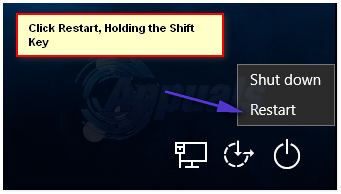
<p>First, on the page prompted here, select and click the OK button, and then press and hold the Shift key on the keyboard. At the same time, select the Shutdown button in the lower right corner and click the Restart button. After entering the next page, select the troubleshooting option, then select the advanced option and click to enter; Then select the startup setting option here. On the next page, we select and click the restart option. On the page that will appear only after the restart, we choose the security mode. Generally, we choose the fourth item, and then we can enter the security mode,</p>


<figure class="wp-block-image size-full is-resized"><img loading="lazy" decoding="async" src="https://cdken.com/wp-content/uploads/2022/12/quxiao.jpg" alt="" class="wp-image-15064" width="439" height="352" srcset="https://cdken.com/wp-content/uploads/2022/12/quxiao.jpg 600w, https://cdken.com/wp-content/uploads/2022/12/quxiao-300x241.jpg 300w" sizes="auto, (max-width: 439px) 100vw, 439px" /></figure>


<p>Next is the work of setting up. There are two ways to solve this problem. The first way can be found on the Internet, but it doesn&#8217;t work very well. But the second way, which can solve the computer problem 100%, will explain both methods to you.</p>


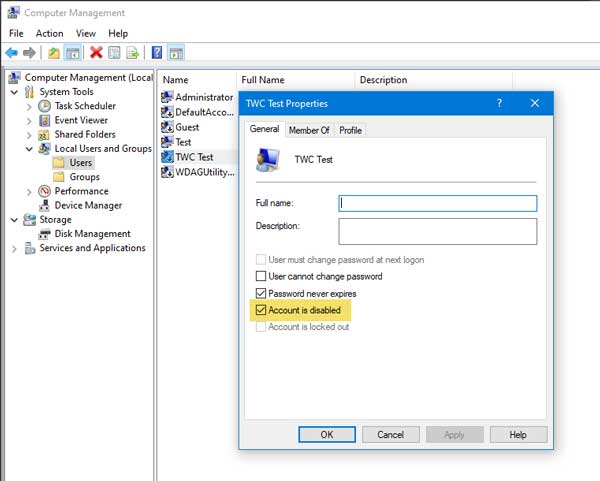
<p>The first method is: Right-click the start logo in the lower right corner and then select Computer Management. Double-click the local users and groups, and then double-click the user, and then double-click the administrator user. Uncheck the &#8220;Disabled this account&#8221; box in this account, and then click OK. However, many times when we operate here, the check box here is unchecked. When this happens, the first method is not easy to use;</p>


<p>We need to use the second method, the second method is also in the lower left corner of the logo: start menu click right, then select run, then enter cmd, then press the return button, and then pop up command line window, we enter the command: net user administrator / active: yes input normal command, we press the return, he will prompt you command operation is complete, this time we restart the computer again, restart, we can see the computer has not appear the prompt error box. At this point, the problem is resolved.</p>
]]></content:encoded>


			</item>
	</channel>
</rss>